

Key Takeaways
Chili Piper helps qualify leads, route them to the right rep, and book meetings faster
Its biggest strengths are scheduling, routing automation, and CRM integrations
Sales reps generally find it easy to use while admins may face more complexity as workflows grow
Pricing starts at $1,250/month on an annual contract, with higher costs for additional seats or features
When an inbound lead is ready to book a meeting, every extra step or delay makes it easier to lose them.
Chili Piper is built to reduce that friction by qualifying leads, routing them to the right rep, and helping them book meetings. But it won’t fit every sales process. You may want another option if you need broader buyer engagement before and after booking or want to reduce ongoing routing administration.
In this Chili Piper review, we’ll look at its main features, pricing, pros and cons, and what current users say, so you can decide whether it fits your needs.
Key Feature | Chili Piper |
Concierge | Qualifies inbound leads, applies routing rules, and lets qualified buyers book meetings immediately after submitting a form |
Distro | Automatically routes CRM leads and records based on territory, ownership, company data, and other rules |
ChiliCal + Handoff | Handles scheduling, booking links, round-robin calendars, and SDR-to-AE handoffs |
Web Experiences | Uses Chat AI and personalized website experiences to engage, qualify, and book visitors before they submit a form |
What is Chili Piper?
Chili Piper is an inbound conversion platform that helps B2B sales teams turn website interest into qualified meetings. It can qualify leads after they submit a form, route them to the right rep based on your rules, and let them book a meeting immediately. It also supports lead distribution and handoffs between sales development representatives (SDRs) and account executives (AEs). Chat AI can engage, qualify, and book website visitors conversationally.
You’ll see names like Concierge for form-based qualification and routing, Distro for lead distribution, Handoff for rep-to-rep scheduling, and ChiliCal for scheduling.
These are product capabilities, not necessarily separate purchasing plans under Chili Piper’s current pricing model.
Chili Piper connects with customer relationship management (CRM) tools like Salesforce and HubSpot, as well as the calendars and sales tools your team already uses. ChiliCal connects with Google Calendar and Microsoft Outlook/Office 365 and uses your connected calendar to check availability.
The tool also offers a Model Context Protocol (MCP) server that connects with compatible AI assistants. Chili Piper MCP lets you check meetings, manage scheduling, and investigate routing.
How we evaluated Chili Piper
We evaluated Chili Piper using its current product documentation, pricing and plan information, integration documentation, and recent reviews on G2 and Capterra. While we didn’t conduct hands-on testing, we made product claims we could verify through published sources.
We assessed Chili Piper across the areas that matter most to sales teams: user experience, routing flexibility, integrations, administration, pricing, and overall value.
While Spara competes with Chili Piper in parts of the inbound conversion market, we’ve aimed to keep this review factual and objective.
Chili Piper features: what they do in practice
Chili Piper’s features address different points where inbound leads can get stuck, from waiting after a demo request to reaching the wrong rep.
Let’s review how its main features work in the sales process and when each one is useful.
1. Concierge: qualify inbound leads and immediately book the demo
Best for: Teams that want to turn demo requests into booked meetings faster.
Concierge is designed for closing the gap between a prospect submitting a form and getting onto a salesperson’s calendar.
You connect it to your website form and map the form fields to Chili Piper. When someone submits the form, Chili Piper can use those answers and CRM data to qualify the lead, apply your routing rules, and show the right rep’s available calendar immediately. The prospect can book without waiting for someone to follow up manually.
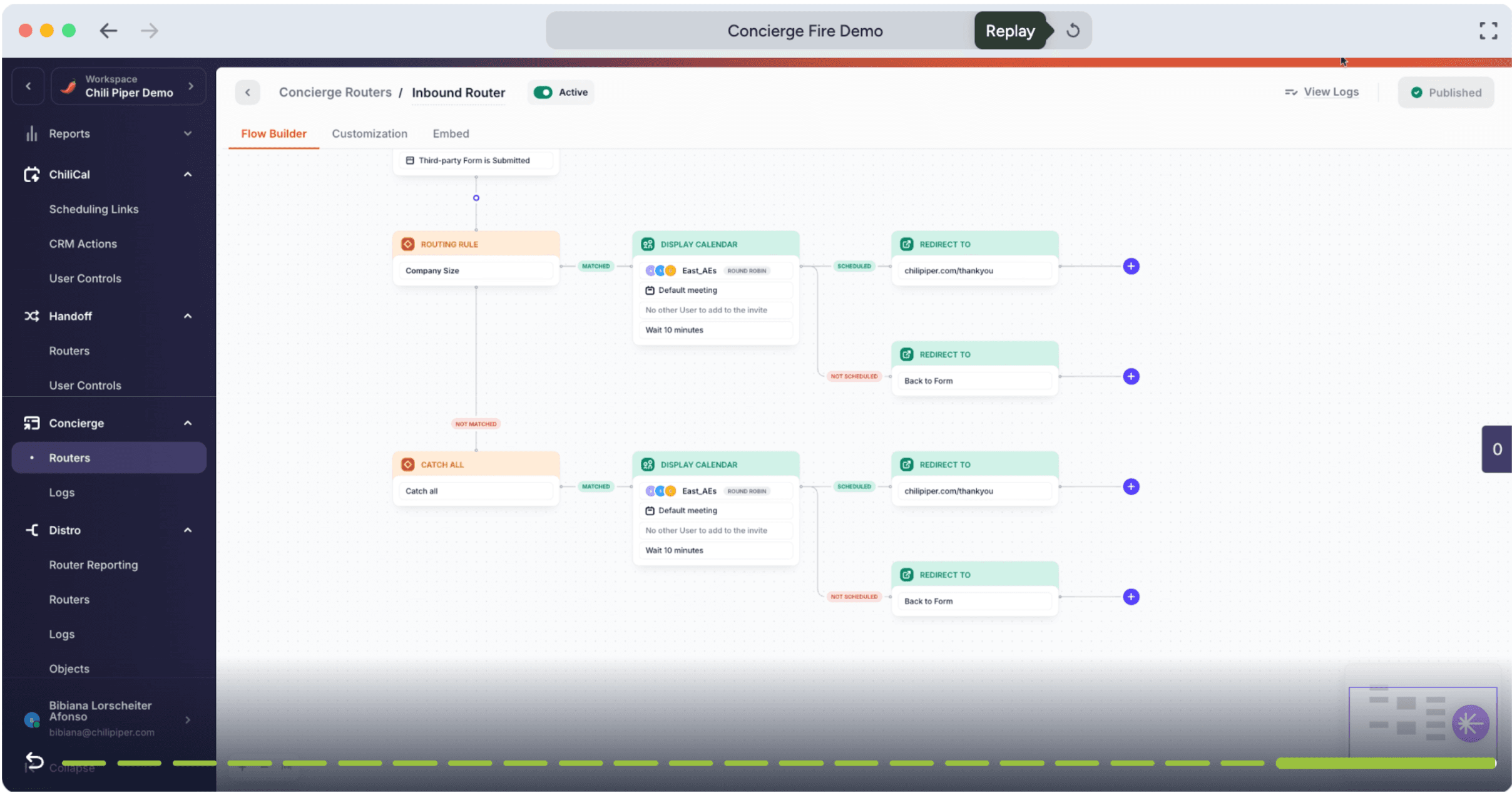
For example, you could send enterprise leads to an account executive while directing smaller companies through a different path based on employee count, geography, revenue, or other data you collect.
2. Distro: automatically route CRM leads and records
Best for: Teams that need to route leads across multiple reps, territories, or ownership rules.
Distro handles leads after they enter your CRM. Instead of having revenue operations (RevOps) or sales teams manually assign new records, you can create rules that automatically decide who should receive them.
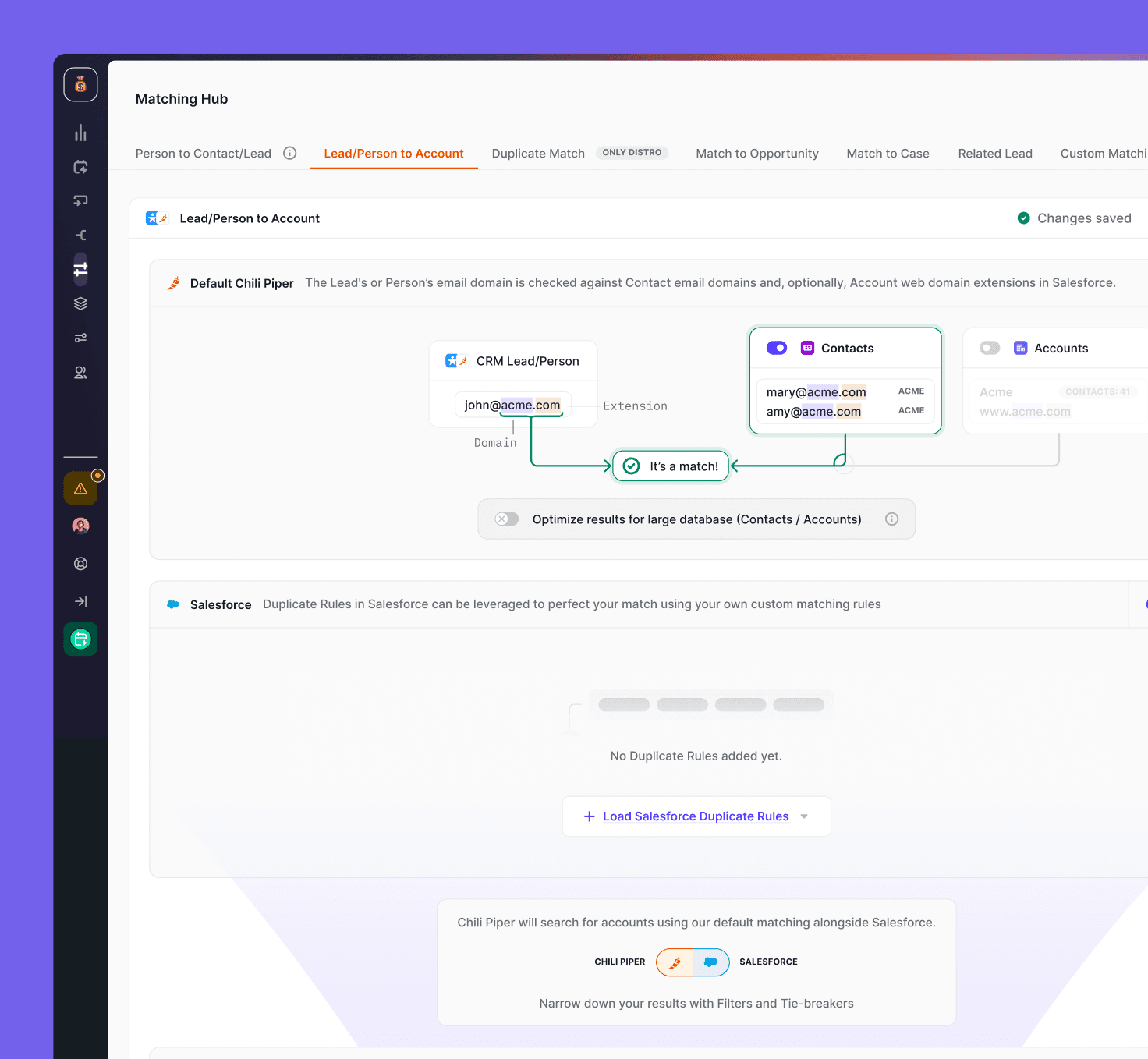
When a CRM record is created or updated, Distro can automatically route it based on rules like territory, company size, or existing ownership. It can also avoid reassigning records that already have an owner.
If you use Salesforce, you can route Leads, Contacts, Accounts, Opportunities, Cases, and custom objects. This gives you more flexibility when your routing needs go beyond new form submissions.
3. ChiliCal and Handoff: make scheduling and SDR-to-AE handoffs easier
Best for: Sales teams that regularly pass qualified prospects between SDRs, AEs, or other customer-facing teams.
ChiliCal handles day-to-day scheduling, while Handoff applies routing rules when one rep needs to book a meeting with another.
For example, an SDR can use Handoff to find the right account executive based on routing rules. They can then see that rep’s availability and book the meeting on their behalf:
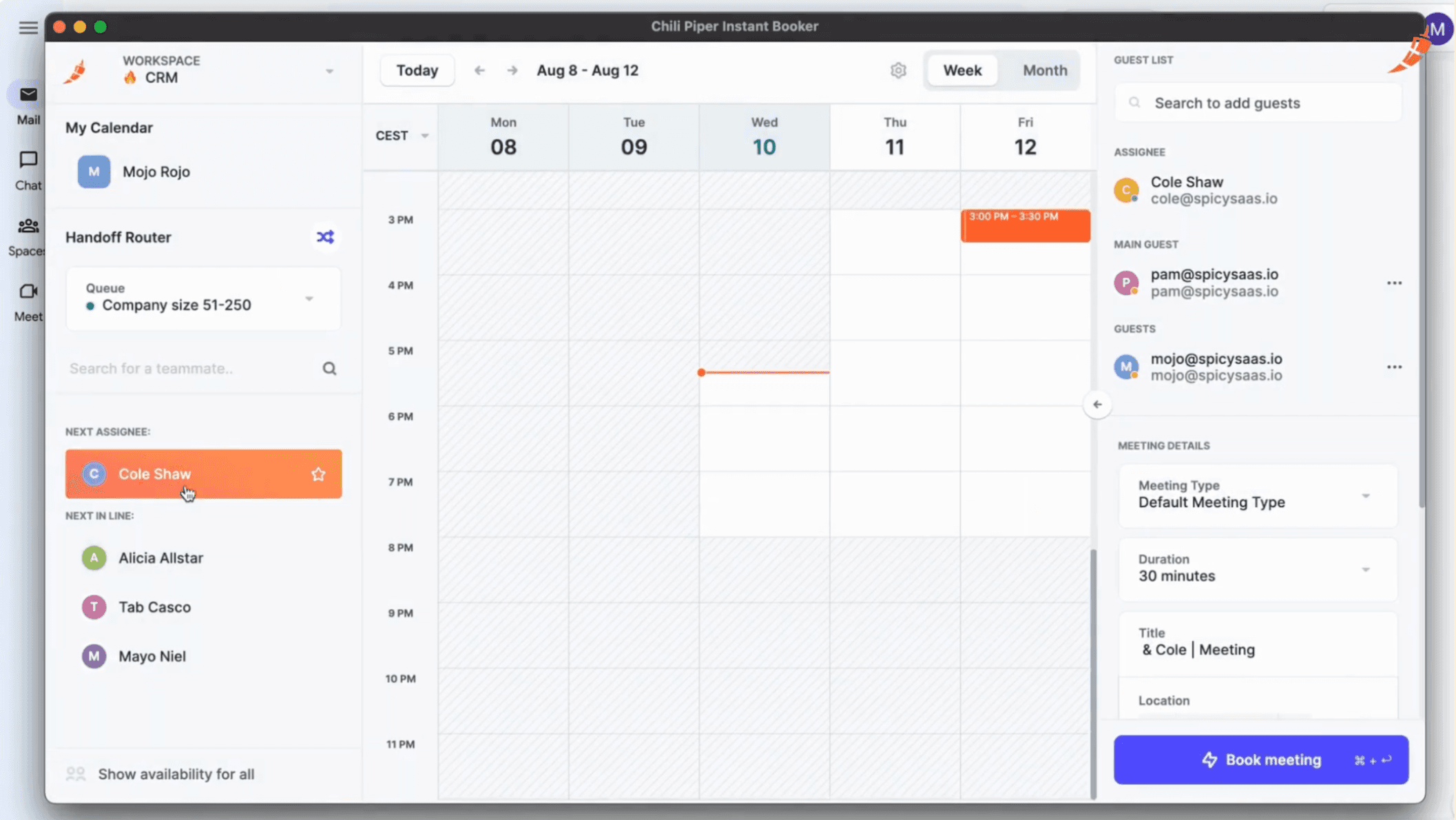
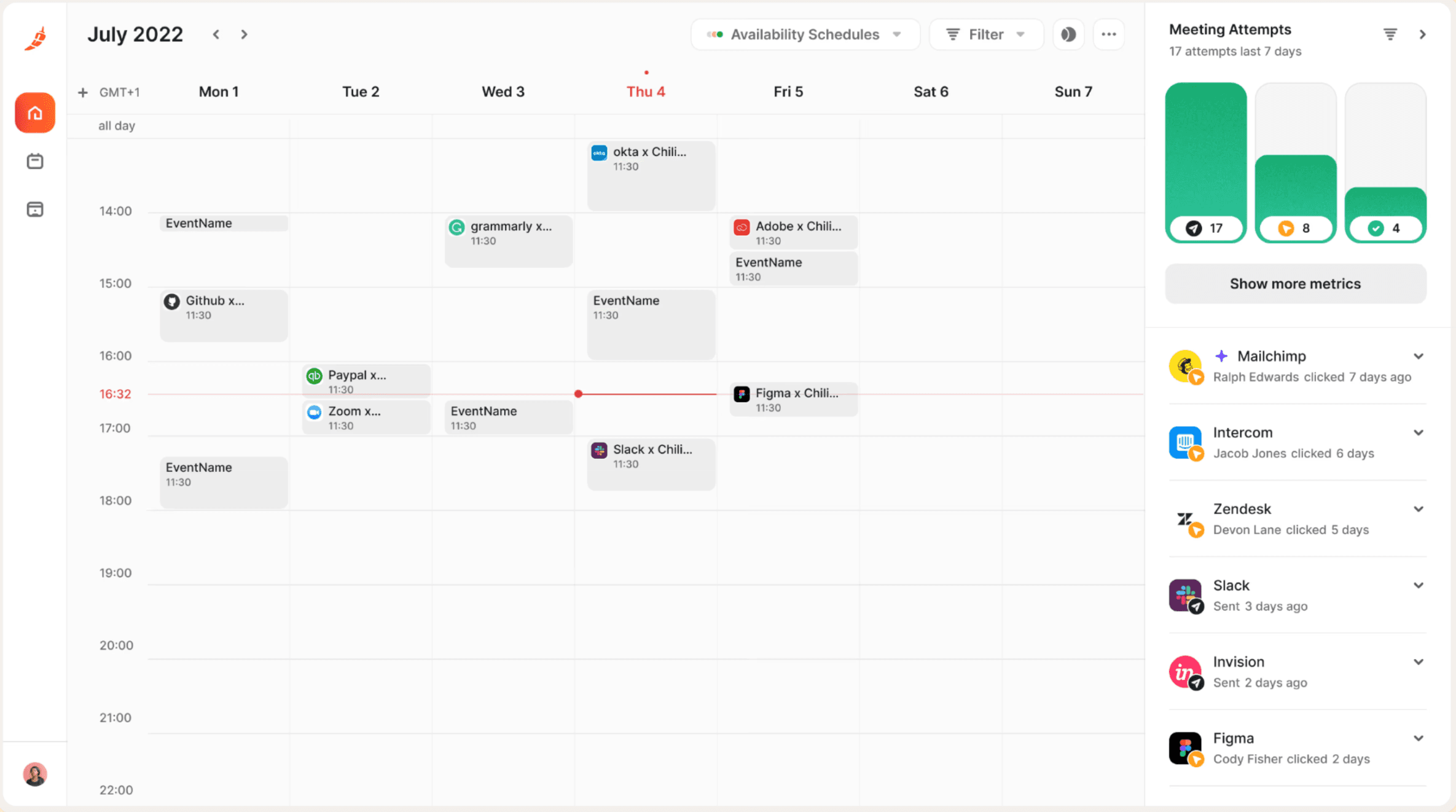
ChiliCal also supports one-to-one, round-robin, ownership-based, and group scheduling from Chili Piper itself or integrations like Salesforce, HubSpot, and Outlook.
4. Web Experiences: engage website visitors before they fill out a form
Best for: Teams with meaningful website traffic that want to convert visitors before they reach or complete a demo form.
Chili Piper’s Experiences tier expands the conversion flow beyond forms. Chat AI can answer visitor questions, qualify them, and book meetings automatically. The Web Experiences feature can surface different calls to action (CTAs) based on who’s visiting.
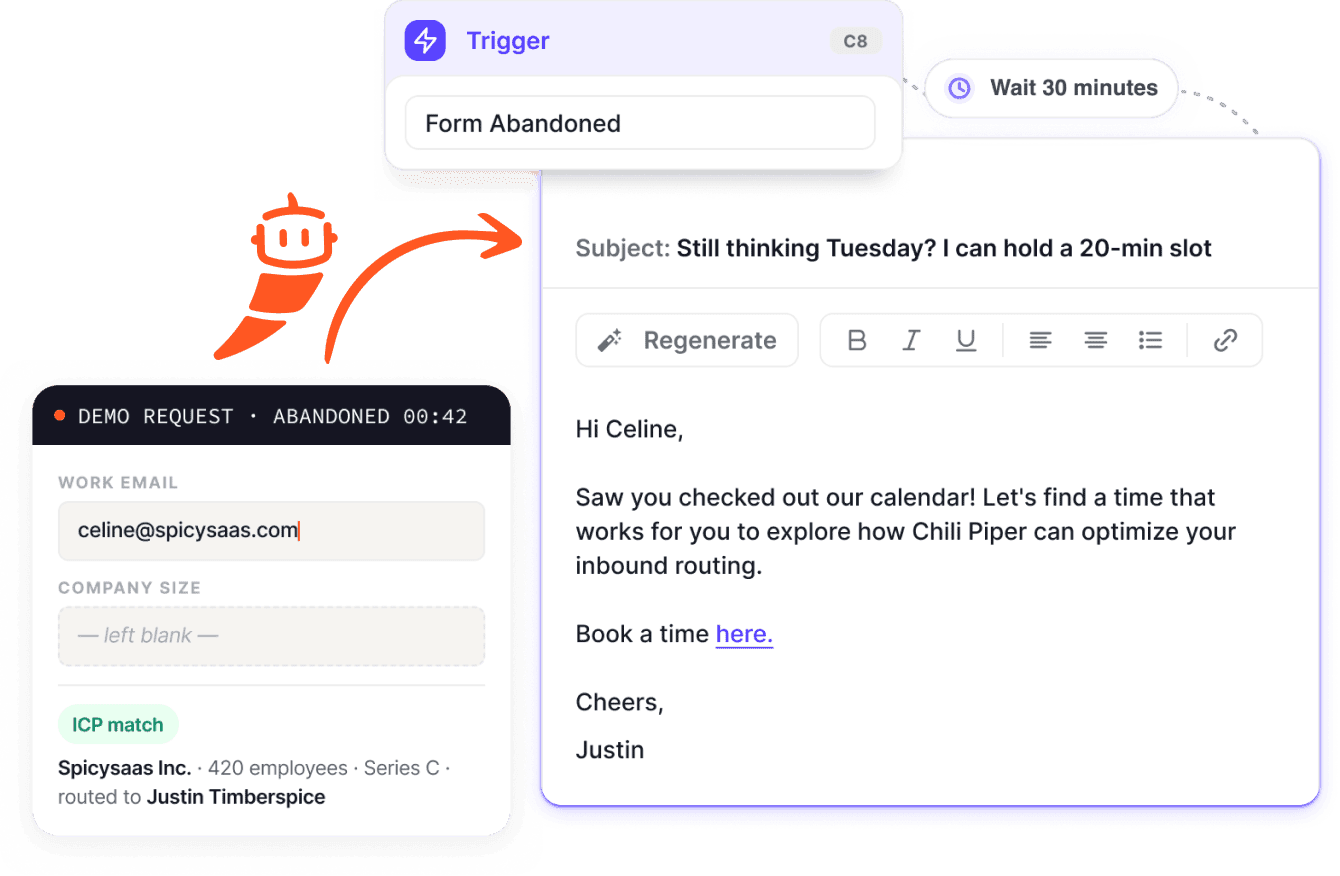
For example, it can identify a high-intent visitor and show them a calendar directly on the page to book without completing a traditional demo form first. Chili Piper can also use company data from providers like 6sense, Bombora, or Leadfeeder to give identified accounts different website journeys.
Note: Account identification requires access to 6sense or Bombora, or Chili Piper credits. Identification rates also vary, so you shouldn’t assume every anonymous visitor can be recognized.
Chili Piper pricing and value for money
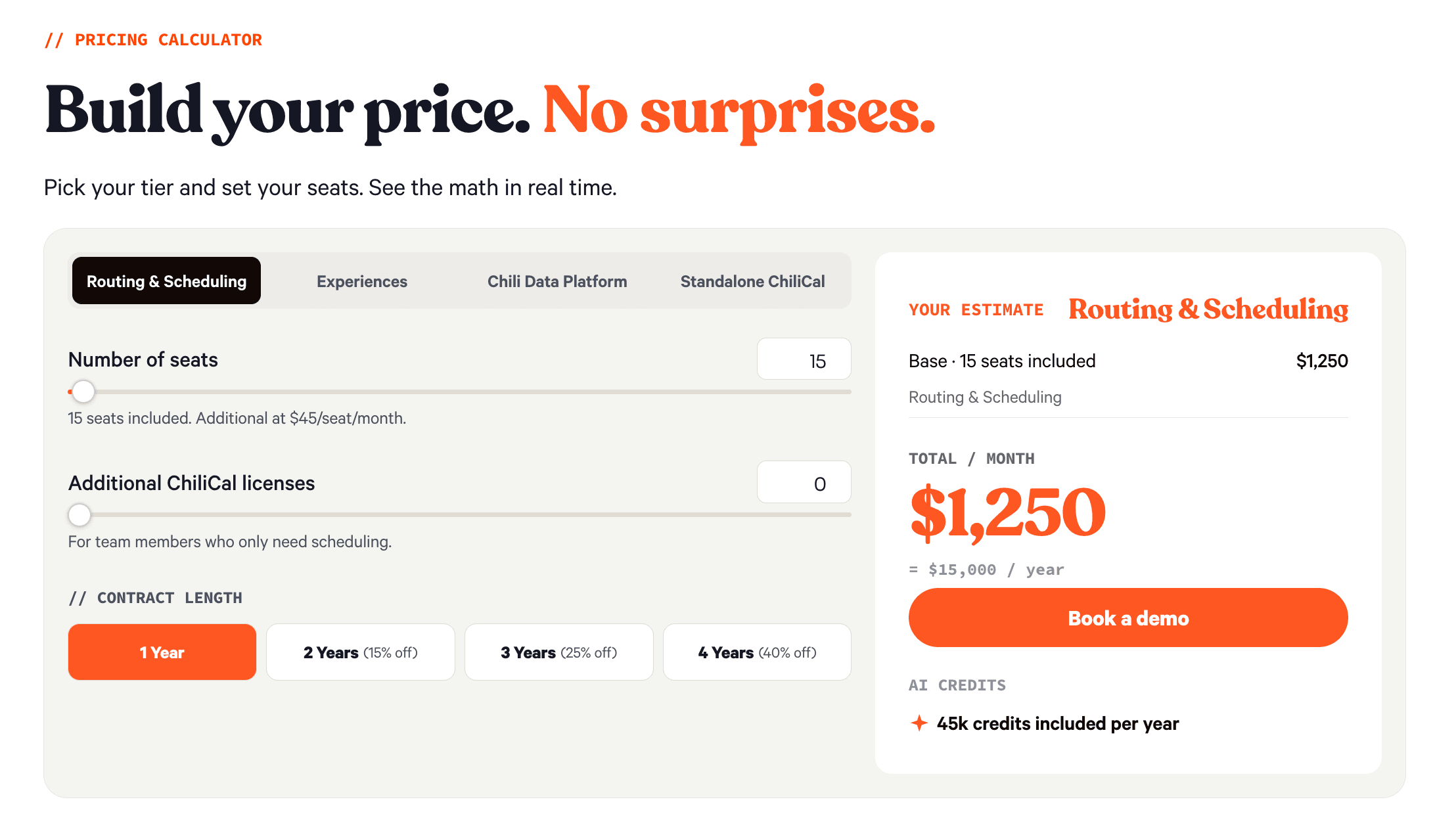
Chili Piper pricing starts at $1,250 per month for Routing & Scheduling and $3,500 per month for Experiences, both on annual contracts.
The company also lists a third tier, Chili Data Platform, as coming soon and hasn’t published pricing or plan details yet (October 2026).
Both existing tiers include ChiliCal. If you only need scheduling without Chili Piper’s broader routing and qualification features, you can also buy ChiliCal separately.
Plan | Starting price | Included seats | Extra seats | AI credits |
Routing & Scheduling | $1,250/month = $15,000/year | 15 | $45/user/month | 45,000/year |
Experiences | $3,500/month = $42,000/year | 30 | $50/user/month | 150,000/year |
Chili Data Platform | Not published | Not published | Not published | Not published |
ChiliCal | $12/user/month = $28,800/year | 200-seat minimum | N/A | N/A |
Your final Chili Piper cost depends mainly on the plan you choose, how many seats you need, and any additional ChiliCal licenses. You can use Chili Piper’s pricing calculator to adjust these variables and see the estimated monthly and annual cost before contacting sales:
Real user reviews: what current Chili Piper users say?
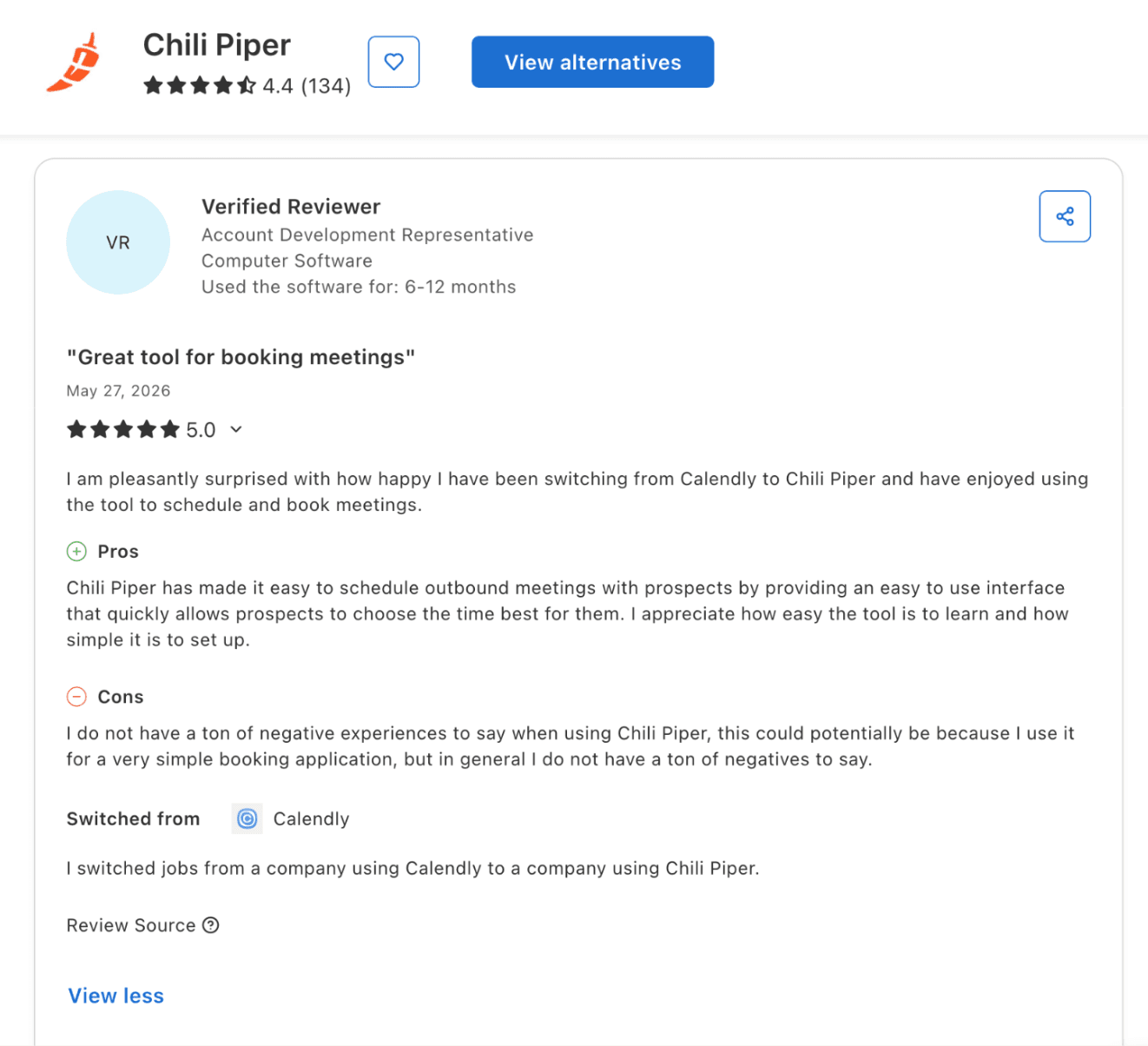
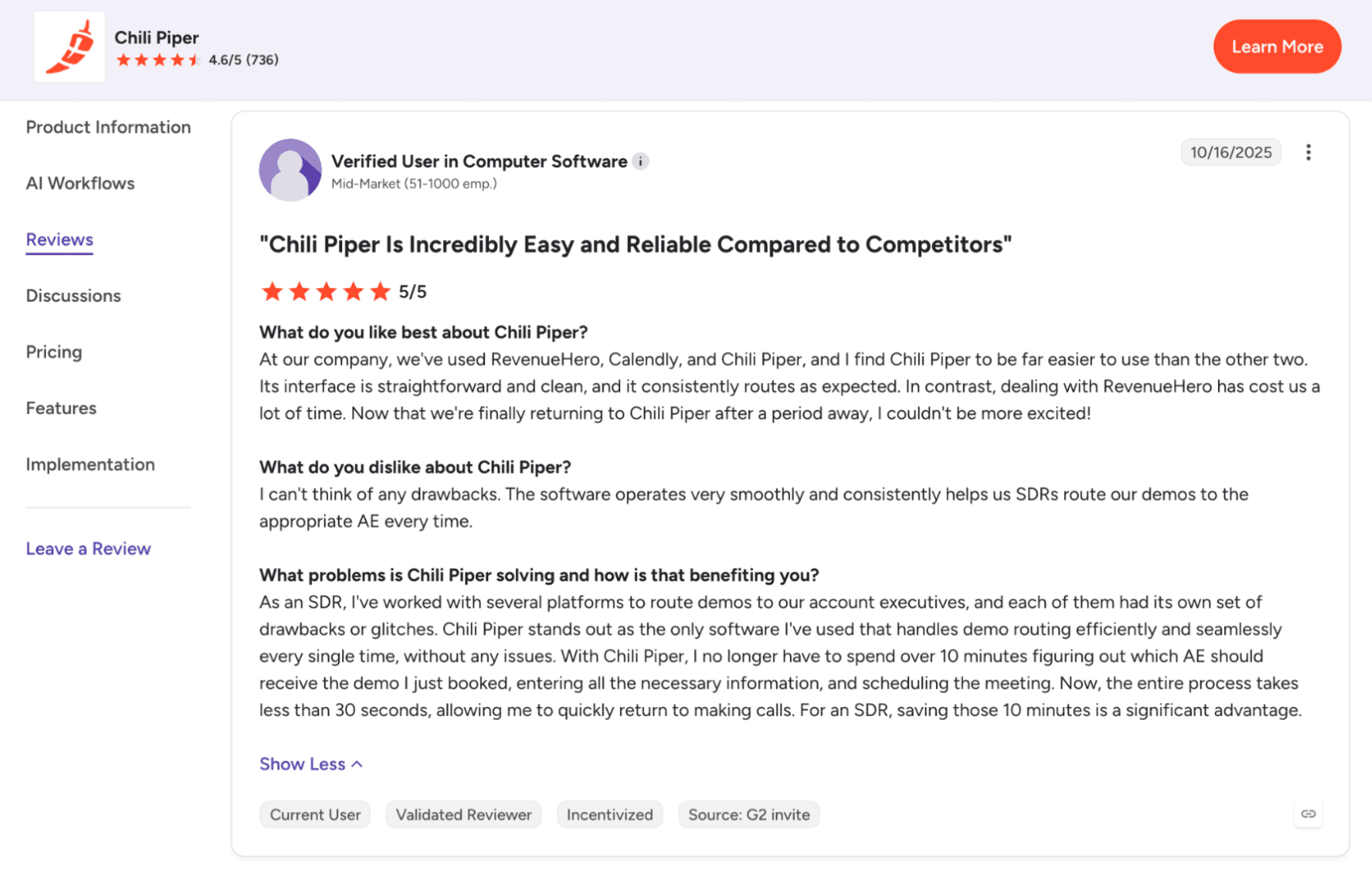
Recent Chili Piper reviews are mostly positive. As of October 2026, Chili Piper has a 4.6/5 rating from 736 reviews on G2 and 4.4/5 from 134 reviews on Capterra.
Users working in sales commonly praise how much easier Chili Piper makes scheduling. One Capterra reviewer working as an Account Development Representative said the booking experience was easy to learn and straightforward for prospects.
A G2 reviewer working as an SDR said Chili Piper reduced a demo-routing task that previously took more than 10 minutes to under 30 seconds.
Admin feedback is more mixed. Some reviewers describe Salesforce integration and routing setup as straightforward, while others say increasingly complex routing makes troubleshooting harder and creates more dependency on knowledgeable admins.
Chili Piper pros: what users love
Fast, simple scheduling for reps. Sales-focused reviewers often mention that Chili Piper removes the back-and-forth involved in booking meetings.
Strong routing automation. G2 reviewers working in operations and RevOps praise Chili Piper for automating lead assignment, territory routing, and round-robin distribution that would otherwise require manual work.
Useful integrations. Reviewers frequently mention Salesforce in particular, along with calendar and CRM integrations that help Chili Piper fit into their existing sales workflows.
Responsive support. Several recent G2 reviewers also highlight Chili Piper’s customer success and support teams as helpful during setup, troubleshooting, and workflow changes.
Chili Piper cons: where users get frustrated
Complex routing can be harder to manage. Some G2 reviewers say Chili Piper becomes more difficult to troubleshoot as routing rules and workflows get more complex.
Some users want more control. One reviewer on Capterra, who’s an Account Executive, liked Chili Piper for scheduling but wanted more control over calendar types and workflow settings.
The price can feel high for simple needs. Some reviewers question the cost when comparing Chili Piper with basic scheduling tools, although that comparison doesn’t account for its broader routing and qualification features.
Admin work can require specialist knowledge. Reviewers working in operations note that setups like territory changes, queue updates, and edge cases are challenging. These processes need someone who understands the platform well, even if day-to-day use is simple for reps.
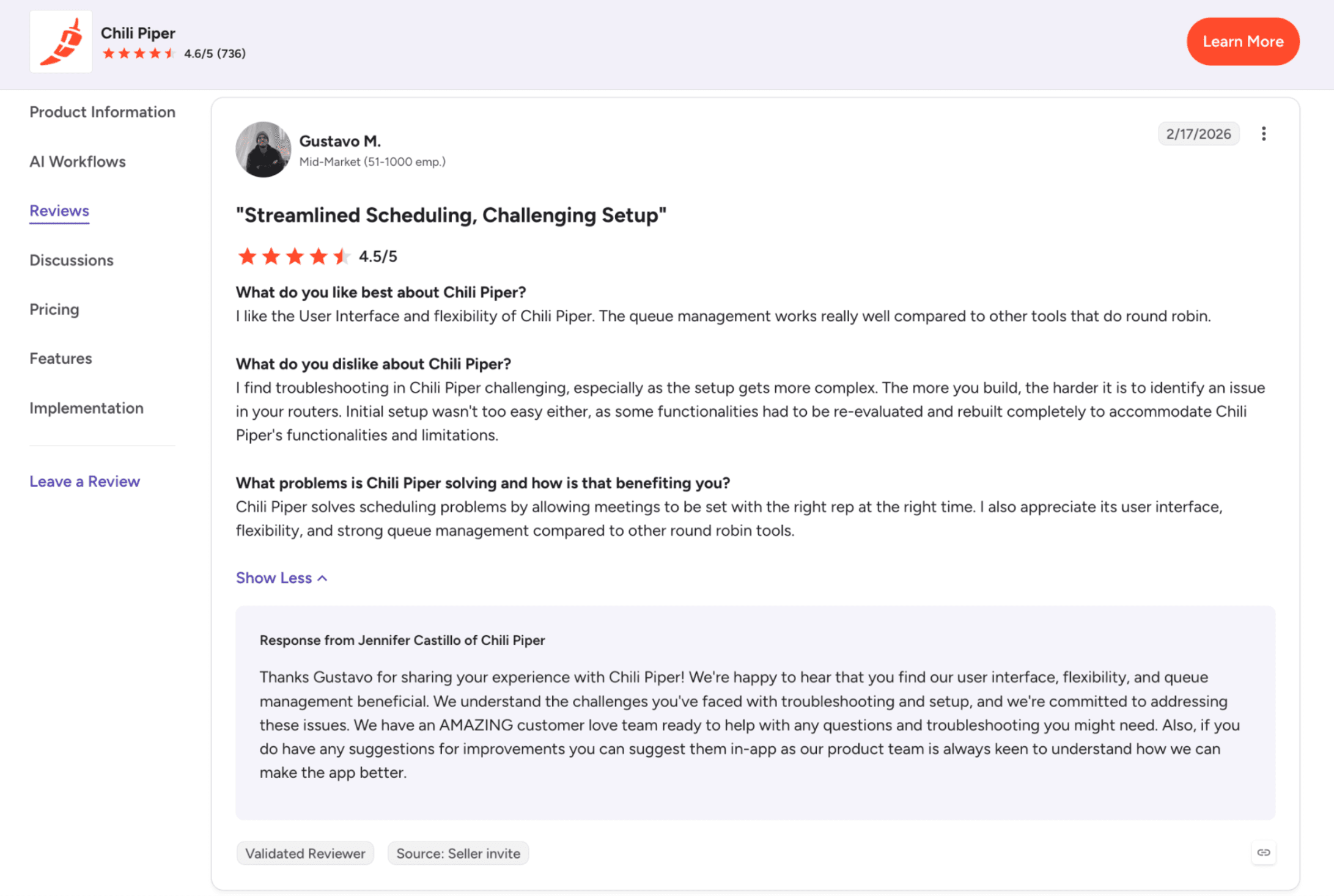
If ongoing admin is a concern for your team, Spara includes white-glove onboarding, a dedicated Customer Success Manager, a Forward Deployed Engineer, and ongoing agent optimization with its plans.
Who is Chili Piper best suited for?
Chili Piper is best suited for B2B sales teams with enough inbound demand and routing complexity to justify automation.
It’s a strong fit if you:
Get a steady flow of demo requests or other high-intent inbound leads
Have multiple reps, territories, round-robin queues, or ownership rules to manage
Already have clear qualification criteria for deciding which leads should reach sales
Use a compatible CRM, such as Salesforce or HubSpot
Need smoother SDR-to-AE handoffs and faster meeting booking
Have RevOps or sales operations resources to configure, test, and maintain routing workflows
For smaller teams with low inbound volume or simple scheduling needs, Chili Piper may be more than you need. It becomes more valuable as your routing, handoffs, and sales process get more complex.
Who should consider another option?
Chili Piper may not be a good fit if your sales process is relatively simple or you don’t have enough inbound volume to justify the cost.
You may want to consider another option if you:
Mainly need basic meeting scheduling rather than qualification, routing, and handoffs
Have a limited budget relative to Chili Piper’s published starting price
Don’t generate enough inbound demand for routing automation to make a meaningful difference
Don’t have RevOps or sales operations resources to configure and maintain more complex workflows
Need an integration, workflow, or contract setup that the relevant Chili Piper plan doesn’t support
In those cases, a simpler scheduling tool or a platform with a different pricing and implementation model may be a better fit. The key is to match the software to the complexity of your sales process rather than paying for capabilities your team won’t use.
What to compare before choosing an alternative?
Before you choose a Chili Piper alternative, look at:
Whether it covers the workflows your team needs
Whether it integrates with your existing sales stack, including a CRM and calendars
How many users are included
What usage limits apply
How much setup and maintenance it requires
How flexible the contract is
What the full annual cost looks like once you add seats, usage, or other requirements
The best alternative depends on why Chili Piper isn’t the right fit for you in the first place. A team that only needs scheduling will have different requirements from one that still needs advanced qualification, routing, and inbound conversion.
Final verdict: when to use Chili Piper and when to switch
Overall, Chili Piper is a strong option for teams with meaningful inbound volume and complex routing or scheduling needs. Spara may be a better fit if you want AI agents to engage with website visitors and continue buyer conversations across chat, email, phone, and text.
Choose Chili Piper if you:
Need advanced lead routing, qualification, scheduling, and SDR-to-AE handoffs
Have established RevOps resources to manage more complex workflows
Rely on Salesforce and need advanced CRM-based lead distribution and routing
Choose Spara if you:
Want AI agents to answer product questions, deliver product demos, and follow up with buyers
Need to re-engage inactive leads and move stalled deals forward
Prefer unlimited seats, white-glove onboarding, and ongoing agent optimization
Spara also integrates with Chili Piper’s ChiliCal and Concierge. So, depending on your existing setup, using the two together may be an option worth exploring.

Lauren ThompsonHead of Marketing, Spara
FAQs
Related posts
View all
GTM
Chili Piper Pricing (2026): Plans, Seats, and Total Cost
Explore Chili Piper pricing, included seats, AI credits, and annual costs. See what affects your total spend and what to confirm before choosing a plan.
Nov 2, 2026
•
7 min read

GTM
Qualified Pricing (2026): Plans, Limits, and Budgeting
Understand Qualified pricing, plan features, and usage limits. Learn what to ask for in a quote and how to compare the full cost with your sales needs.
Nov 2, 2026
•
7 min read

GTM
Qualified Integrations: API, MCP, and Stack Fit
Explore Qualified integrations, API options, and MCP capabilities. See supported tools, access requirements, and how to assess fit for your GTM stack.
Nov 2, 2026
•
5 min read
Sign up for the latest from Spara
Subscribe to get more GTM insights straight to your inbox.