

Key Takeaways
Qualified is an AI-powered agentic marketing platform that includes Piper, an AI SDR that engages visitors across various channels, such as voice, web chat, and email
The platform publishes three plans: Premier, Enterprise, and Ultimate, with no public pricing available (contact a Qualified sales rep for a quote)
Piper plans differ based on monthly limits to web sessions and active email contacts, along with feature gates such as API access and a dedicated IP address
Qualified is ideal for Salesforce-based teams with high traffic that don’t require rapid onboarding (since Qualified implementation takes around 1 month)
Qualified Piper pricing is quote-only, so the company doesn’t publish pricing for Piper, its AI SDR agent, anywhere on its website. Despite any estimates you might find on third-party websites or forums, the only way to determine how much Piper will cost is by reaching out to a Qualified sales rep.
Qualified offers three Piper plans: Premier, Enterprise, and Ultimate, as of October 9, 2026. Each plan comes with its own usage limits and access to gated features.
How much does Qualified cost?
Qualified takes a custom-quote approach to plan pricing, so you won’t find any pricing on the website or anywhere else. Since Qualified doesn’t publish its prices, it’s best to contact them for a quote. Here’s what Qualified includes on its Piper pricing page.
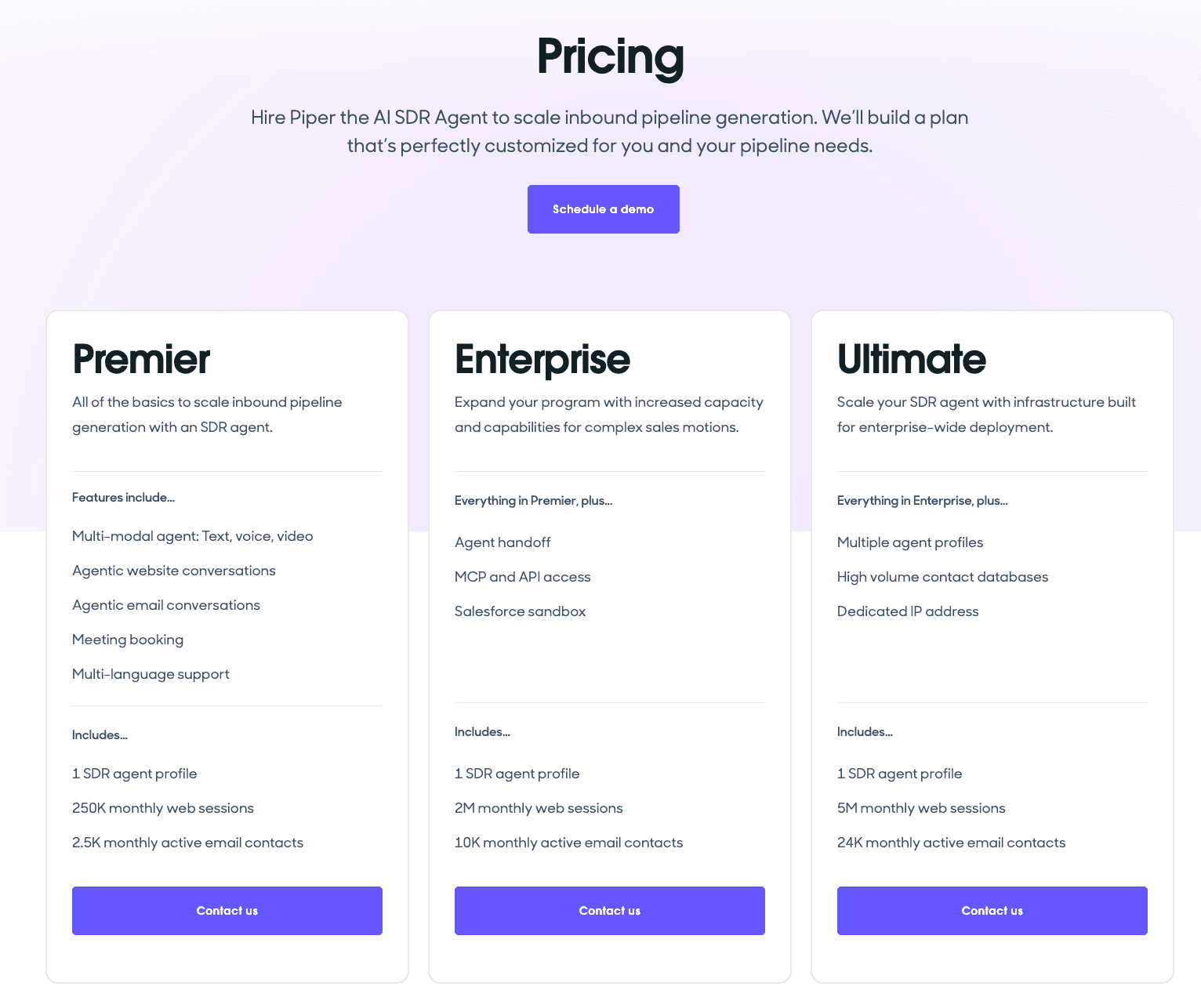
Qualified Piper pricing page
A VP of Marketing on G2 Reviews wrote on January 13, 2025: “A downside to Qualified is that it’s a little pricey,” but he adds that compared to Drift and other players in the market, “the pricing is on par for a solution at this level.”
By the way, if you’re considering replacing Drift with Qualified before it shuts down on January 31, 2027, take a look at our blog post comparing Drift vs. Qualified.
Spara takes most customers live within 14 days. Start engaging and converting inbound leads. Talk to Spara
Qualified pricing plans explained
Here is a quick breakdown of each Piper plan. We’ll go into greater detail about each plan’s features and usage limits below.
Plan | Published price | Included capabilities | Usage limits | When to consider it |
Premier | Quote-only | Multi-modal, conversational agent (text, voice, video); agentic website and email conversations; books meetings; multi-language support | 250K monthly web sessions; 2.5K monthly active email contacts | Teams with moderate workflow volume and no need for MCP and API access |
Enterprise | Quote-only | Everything in Premier + MCP and API access; agent handoff; Salesforce sandbox | 2M monthly web sessions; 10K monthly email contacts | Teams with high traffic volumes or those requiring greater customization through API/MCP handoff, sandbox testing |
Ultimate | Quote-only | Everything in Enterprise + high-volume contact databases; dedicated IP address | 5M monthly web sessions; 24K monthly email contacts | Teams with very high traffic or email volumes or those requiring a dedicated sending IP or a high-volume contact database |
Premier
Qualified’s entry-level Piper plan works well for teams with moderate website traffic and minimum customization requirements. Teams with higher website traffic or email volumes, or those requiring MCP or API integrations, sandbox testing, or a dedicated IP, should consider Piper’s Enterprise or Ultimate plans.
The Piper Premier plan includes:
Multi-modal agents that have conversations with prospects through text, voice, and video
Agentic email follow-up
Meeting booking
Multi-language support
Usage limits:
250,000 monthly web sessions
2,500 monthly active email contacts
Enterprise
Qualified’s Enterprise plan for Piper includes everything in the Premier plan, along with expanded usage limits and additional features. Carefully consider both your usage volume and customization requirements to ensure your plan meets your minimum requirements.
The Piper Enterprise plan includes:
Everything found in the Premier plan
API access to build custom workflows with your own code
MCP access to share context between Piper agents and other AI tools
Agent handoff to share conversations and context with other AI agents
Salesforce sandbox access to test each setup before it touches live data
Usage limits:
2 million monthly web sessions
10,000 monthly active email contacts
Ultimate
Qualified’s Ultimate Piper plan comes with everything covered in the Premier and Enterprise plans, along with larger usage limits and a dedicated sender IP address.
The Piper Ultimate plan includes:
Everything found in the Premier and Enterprise plans
A dedicated IP for greater control over your sender reputation and deliverability
Usage limits:
5 million monthly web sessions
24,000 monthly active email contacts
All Piper plans come with multi-modal agents, specialized in conducting conversations across text, voice, and video. The agents gather information, communicate with Salesforce, conduct follow-up conversations via email, and book meetings. All plans offer multilingual support as well, but you’ll want to check with a sales rep to determine which languages Piper covers.
What could increase your total Qualified costs?
Your total cost for Qualified’s AI platform can extend past the plan quote, as with any SaaS product. For example, additional costs might result from implementation expenses, product upgrades as you scale, and other sources.
Don’t assume anything based on standard SaaS contracts. Ask a Qualified sales rep about the following items, and double-check the contract before signing.
Higher usage and plan upgrades
Each Qualified plan tier has specific usage limits on monthly web sessions and emails (see above). If you find yourself approaching those limits and decide to upgrade your plan, that will obviously increase your costs.
What isn’t so obvious is what happens when you exceed those limits on any given plan. Are you simply cut off, or is there an option to pay overage charges and continue beyond those limits? These are key questions to ask a sales rep and outline in the contract.
Implementation and ongoing management
Speak with a sales rep to determine whether Qualified covers the cost of onboarding and professional services for internal configuration, testing, workflow optimization, and continued maintenance. If there are extra costs involved for this work, that’s worth noting and adding to your overall price assessment.
Also, anything that isn’t covered will pull resources away from your existing tech team, so that’s important to note when you propose AI SDR solutions to your leadership team.
Connected tools
When evaluating your budget and total price, be sure to consider costs for any tools you’re planning to add so you can get the most out of Qualified. For example, if you plan to swap out your existing CRM for an alternative, note any additional costs you might incur by making the switch.
Contract terms
Before signing up for Piper, be sure to ask your sales rep to clarify your contract terms. Buyers sometimes make assumptions based on standard SaaS contracts, but it’s important to clarify everything upfront.
Add the following items to your checklist:
Billing cadence: Is it monthly, quarterly, or annually?
Contract term: How long are you committed?
Renewal: Does it renew automatically?
Cancellation requirements: How much notice do you need to give before canceling? What fees are involved?
Package changes: Can you upgrade or downgrade during the contract period? If so, what fees are involved?
Spara offers white-glove onboarding and weekly agent optimizations. Talk to Spara
Which Qualified plan fits your team?
Choose the lowest-tiered plan that meets all your requirements. If any plan falls short of a given requirement, evaluate the next plan up. For example, even if your web sessions and email contacts fit well within the Premier plan limits, consider the Enterprise plan if you require API and MCP access.
Requirements | Plan to Evaluate | What to confirm |
Any of the following:
| Piper Premier plan | Ensure you have no need for:
If you need any of these, consider a higher-tiered plan. |
Any of the following:
| Piper Enterprise plan | If you require any of the following, consider the Ultimate plan:
|
Any of the following:
| Piper Ultimate plan | Ensure that your team requires at least one of the following:
If you won’t require at least one of these items throughout the course of your contract, consider either the Premier or Enterprise plan. |
You can read our post about alternatives to Qualified to discover other leading AI SDR platforms.

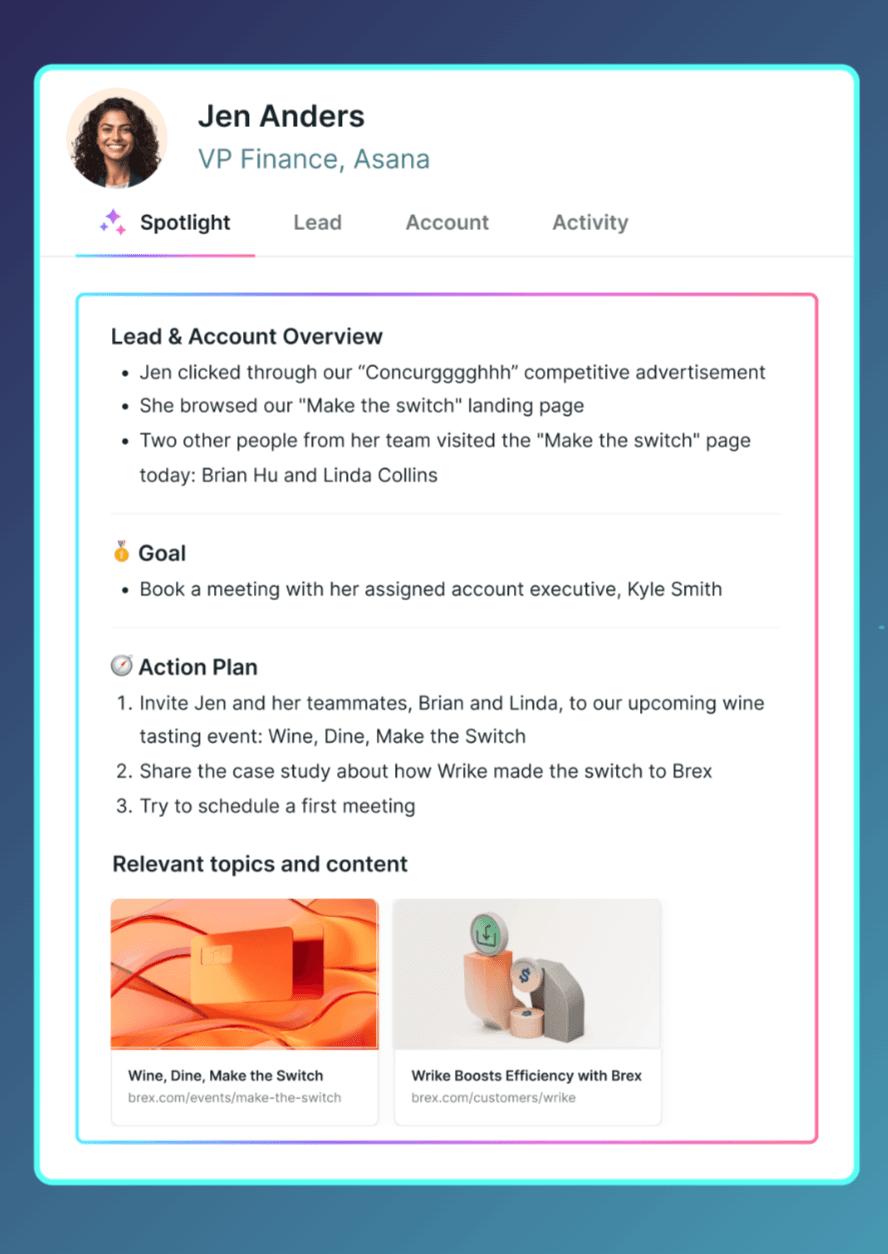
Piper’s video and voice chat panel
Qualified vs. Spara: pricing and value
Spara is a competitor to Qualified, using AI SDR agents to engage prospective customers through chat, email, voice, text, and AI product demos.
Spara, like Qualified, offers three plans: Starter, Growth, and Enterprise. Let’s compare the features within each plan tier so you can make an informed decision when choosing between Qualified vs. Spara. You can also read our in-depth Qualified review to learn more about Qualified’s Piper AI SDR.
Product Scope | Qualified | Spara |
Channels | Website chat, voice, video, and email | Website chat, voice, email, and AI product demos |
Features | API and MCP access on Enterprise plan, high-volume database and dedicated IP address on Ultimate plan | Growth plan comes with A/B testing and visitor deanonymization; Enterprise plan comes with multivariate testing, SSO/SAML, and API access |
Usage Measures | Plan limits by monthly web sessions and active email contacts | Starter: $2,100 per month (billed annually)Growth: $3,750 per month (billed annually)Enterprise: Contact Spara for a custom quote |
Implementation and Onboarding | Around 1 month | Most customers go live within 14 days, with white-glove onboarding |
Ongoing Effort | Contact sales rep for details | Assigned Customer Success (CSM) Manager and Forward-Deployed Engineer (FDE), with weekly agent optimizations on every plan |
Visit the Spara pricing page for detailed pricing information.
Final verdict: Is Qualified worth the cost?
Qualified can work for Salesforce-based teams receiving high website traffic that justifies the cost, along with those who have a genuine need for at least one of the features each plan offers.
We recommend validating the product on a real buyer journey before signing any contracts. Keep in mind that a higher volume of booked meetings, in and of itself, isn’t enough to prove ROI.
Evaluate your expected incremental gross profit or contribution margin. How many of those meetings convert to genuine sales opportunities? How many sales showed up on the balance sheet that wouldn’t have been possible without Qualified? That’s the real test.
Consider Spara if you want to include AI product demos or A/B testing in your workflows (available on the Growth plan and above), or texting (SMS) channels and multivariate testing (available in Spara’s Enterprise plan).
Spara also has a straightforward, intuitive interface that is easy to learn and use. Plus, it’s great for teams that want to get started quickly, since most Spara plans go live within 14 days.
Finally, Spara is worth a serious look if your goal is agent-led growth for inbound SDR automation, where AI agents run the motion across the sales cycle before passing the information to your sales reps. Sales reps take over where human judgment is key, creating a seamless system designed to convert inbound leads into sales.
Test a real buyer journey before you commit, and see how Spara converts inbound leads into new business. Talk to Spara

Lauren ThompsonHead of Marketing, Spara
FAQs
Related posts
View all
GTM
Qualified Review (2026): Piper, Pricing, and Who It Fits
Our Qualified review covers Piper AI Sales Development Representative (SDR), pricing, integrations, and user feedback, with the trade-offs and who the platform fits in 2026.
Nov 2, 2026
•
10 min read
GTM
Qualified Integrations: API, MCP, and Stack Fit
Explore Qualified integrations, API options, and MCP capabilities. See supported tools, access requirements, and how to assess fit for your GTM stack.
Nov 2, 2026
•
5 min read
GTM
Drift sunset 2026: timeline, impact, and next steps
Salesloft retires Drift on January 31, 2027. See what stops working, when unexported data is deleted, and how to plan your move.
Oct 16, 2026
•
8 min read
Sign up for the latest from Spara
Subscribe to get more GTM insights straight to your inbox.