

Key Takeaways
Qualified connects with Salesforce and a range of marketing automation platforms, sales engagement and intent software, ad platforms, collaborative tools, and more
Salesforce is the only CRM that works with Qualified as of October 2026, and HubSpot only connects as a marketing automation tool
Qualified offers three types of APIs: reporting APIs for exporting data, utility APIs for specific operations, and JavaScript APIs for customizing website interactions
Piper Enterprise and Ultimate plans list MCP support, but prospective customers should confirm which MCP and API capabilities are currently available
Choose your AI SDR based on workflow fit by evaluating your customer journey and how well it works with your GTM stack
Qualified integrations cover a wide range of tools that Salesforce-based B2B marketing teams use, from marketing automation to sales engagement and intent software.
This guide covers the different categories of tools that connect natively with Qualified and Piper, its AI Sales Development Representative (SDR). We also explore where it might make sense to use APIs for custom integrations. Finally, we’ll discuss what Qualified has confirmed about Model Context Protocol (MCP) connections, which allow AI agents to interact with the platform.
Spara competes with Qualified, so we’ve worked to provide objective facts about Qualified’s integrations and capabilities. To that end, we examined Qualified’s integrations and pricing pages, Qualified API documentation, and product announcements available as of October 2026.
Which tools does Qualified integrate with?
Every Qualified deployment runs on Salesforce, and all other integrations feed into it or work alongside it. Salesforce is the foundation, and Qualified’s integrations page lists more than 20 native integrations across a range of categories.
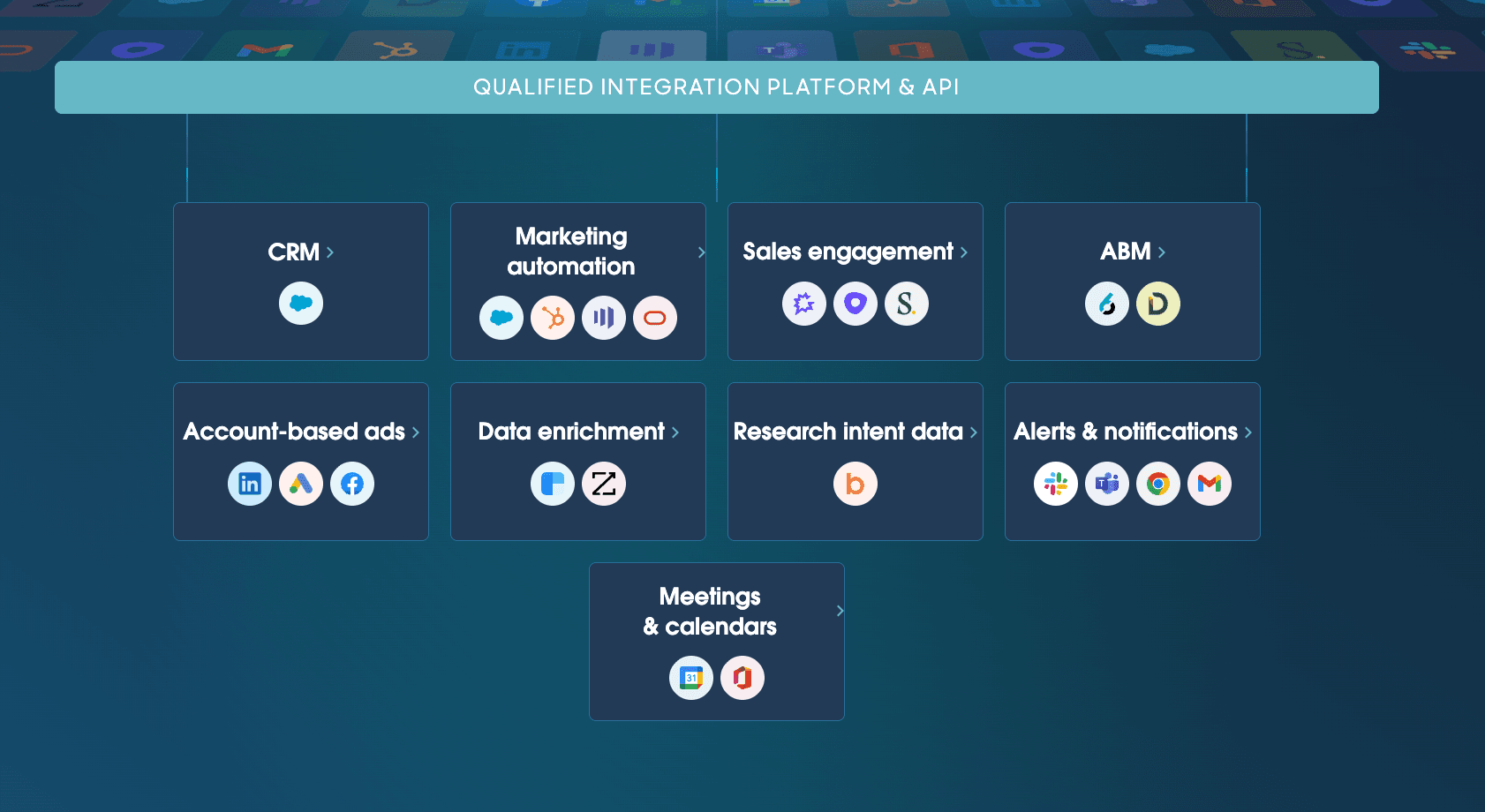
Qualified covers 20+ integrations across 9 categories. Source: Qualified website
Qualified lists 9 categories of integrations, with examples of each type of software and explanations of what they do. All the platforms listed on the chart below connect natively to Qualified, so they don’t require API customization from your IT team.
The final column notes implementation details worth confirming before connecting each tool. Salesforce is the only software on this list that is required to run Qualified. For the others, you’ll need an account, and most require a paid subscription.
Category | Tool(s) | What the connection does | What to confirm |
CRM | Salesforce | Stores leads, contacts, and accounts; logs activity; routes leads; identifies key accounts | Ensure that objects and fields sync correctly when configuring an integration |
Marketing Automation | Salesforce MCAE, HubSpot, Marketo Engage, Eloqua | Connects campaigns, forms, and email engagement to website conversations | Sync direction for each tool |
Sales Engagement | Outreach, Salesloft, Gong | Connects sequence and cadence activity to website visits | Which actions each platform logs; whether conversations from Qualified are logged back to each sales engagement tool |
Account-Based Marketing (ABM) | 6sense, Demandbase | Connects ad campaigns to website conversations; helps reps engage visitors based on ad clicks | Which account fields and campaign data update in Qualified; how routing rules work for target accounts |
Account-based Ads | LinkedIn Ads, Google Ads, Facebook Ads | Flags visitors who arrive from paid ads, allowing sales reps to reference a given ad in their follow-ups; pushes Qualified’s high-intent account data to the platform for ad targeting | Which ad details and customer behavior show up in Qualified; how information from Qualified can further shape ads shown to key accounts |
Data Enrichment | Clearbit, ZoomInfo | Identifies visitors and their companies via reverse IP lookup; records company and contact details in Qualified; enables reps to prioritize and route key targets | Which fields are recorded in Qualified and Salesforce; how the system handles anonymous visitors; which specific products you need within Clearbit and ZoomInfo platforms |
Research and Intent Data | Bombora | Flags visitors researching relevant topics across third-party websites; spots possible buying intent; helps users prioritize important accounts | Which topics a user can track; how Bombora uses them to identify and prioritize accounts |
Alerts and Notifications | Slack, Microsoft Teams, Chrome, Gmail | Notifies reps via Slack when qualified prospects visit the website; supports two-way Piper conversations via Slack | Which events can trigger alerts; which Salesforce fields show up in alerts |
Meetings and Calendars | Google Calendar, Microsoft 365 | Presents scheduling options to prospects based on sales rep availability, allows visitors to book directly from the Qualified chat window | How meeting ownership works; how booking and round-robin rules play out |
How Qualified integrations support your sales workflow
The native integrations listed above are all designed to support your sales workflow at various stages.
A list of over 20 integrations across 9 categories is a lot to digest, but we can break most of the value into 3 broad groups: Salesforce and marketing automation, account and engagement data, and alerts and calendars.
Salesforce and marketing automation
As we mentioned earlier, Qualified doesn’t integrate with any CRM besides Salesforce as of October 2026. You can connect Qualified to HubSpot for marketing automation, or you can use Salesforce MCAE for those automations.
Qualified uses Salesforce’s lead, contact, and account data to identify visitors, qualify accounts using the qualification rules you set up, and route each lead to the right person on the sales team. This use case is key to B2B lead qualification, since teams using an ABM approach will want the system to handle leads from target accounts differently than a random visitor.
While Qualified users can’t use HubSpot for their CRM as of October 2026, they can use HubSpot Marketing Hub, according to Qualified’s HubSpot integrations page. Qualified’s integration, Piper for HubSpot, lets you do things like follow up on form submissions, send event emails, respond to website engagements, and issue meeting invitations. It also syncs contacts, conversations, and booked meetings.
Marketo Engage, Eloqua, and Salesforce MCAE also work as marketing automation layers alongside the Salesforce CRM.
Sales engagement, intent, and enrichment
This category of integrations includes platforms that help Qualified understand:
Who a visitor is
What organization they work for
Key data about a prospect’s organization (size, revenues, sector, etc.)
What they’re hoping to accomplish with their visit
Where they are in the sales cycle
You can have Outreach or Salesloft send sales sequences. By connecting either one to Qualified, you can get alerts when click-throughs occur from an email Call to Action (CTA). When that happens, Qualified can take over from web conversations.
6sense, Demandbase, and Bombora evaluate account-level intent signals and send alerts. ZoomInfo and Clearbit collect in-depth research on the organizations and update the CRM.
Alerts, email, and calendars
By connecting with Slack, Microsoft Teams, Gmail, or Chrome, you can have Qualified send notifications based on a variety of triggers. For example, if someone from a target account clicks on your pricing page, either platform can ping the appropriate sales reps.
Note that the Gmail integration sends alerts to your reps. It’s separate from Piper’s own email capability, which follows up with prospects directly.
Calendar access works through Google Calendar and Microsoft 365. When connected to Qualified, visitors can book meetings with sales reps.
Need an AI SDR that gives you more options than Salesforce as a CRM? Spara works with HubSpot, Salesforce, and Marketo to gather information, qualify prospects, book meetings, and route the information to the right rep. Talk to Spara
Qualified API options and what they support
Qualified offers three APIs for work that its native, pre-built connectors don’t cover. The Reporting API and the Utility API run on Qualified’s servers, while the JavaScript API runs on your own website.
Interface | Supported purpose | Access or activation | Implementation owner |
Reporting API | Exporting AI agent and human conversation data | Available on eligible plans; requires endpoint activation and an API key | Your in-house data or software engineering team |
Utility API | Handles deletion requests, meeting cancellations, etc. | Available upon request; requires activation and an API key | Your software engineering team |
JavaScript API | Supports visitor identification, custom events, messenger controls, and session identity | Added to your site’s code | Your web team |
Source: Qualified API Overview, published July 23, 2025
Qualified’s pricing page lists MCP/API access on its Enterprise and Ultimate plans as of October 2026, while Qualified’s API Overview from July 2025 references access by plan eligibility and upon request. Speak with a Qualified sales rep to determine exactly what each plan covers.
Reporting and utility APIs
Qualified’s Reporting API exports conversation data so users can analyze it outside of the Qualified platform. One use case would be to export the data into Snowflake or another warehouse, then report the data in a Business Intelligence tool like Tableau or Looker.
Once you’ve got the data accessible in a BI tool, you might analyze it to see which AI SDR conversations led to meetings, which follow-ups converted to sales, etc. All this information can inform your AI lead follow-up strategy.
Keep in mind that these tools are just examples of applications you can potentially connect to Qualified using the reporting API. Feeding data into them requires custom development, since they aren’t native.
Utility API use cases are narrower. This handles deletion requests and meeting cancellations, and Qualified says it's available upon request. For both of these server-side APIs, you must activate the endpoint before generating an API key.
Check with a Qualified sales rep to confirm the current activation process, along with any possible rate and data retention limits.
Client-side JavaScript API
The JavaScript API allows your website to send information to Qualified and control the chat experience. Let’s say, for example, a user with a registered account logs into your website and visits the help page. Your website could send the email address to Qualified, so Piper conducts the conversation with the account context already in place.
The JavaScript API also supports custom events, messenger controls, and session identity. As of October 2026, Qualified states that your web team owns troubleshooting for any custom code they create.
What is confirmed about Qualified MCP?
MCP is an open standard that allows AI agents to connect with tools and share context. Qualified currently lists MCP access for both its Enterprise and Ultimate plans, but you’ll want to speak with a sales rep to confirm exactly what this entails.
In a statement on its website, Qualified announced that it would ship Qualified MCP server and MCP client support, Data 360 integration, and agent handoff by the third quarter of 2026, but the announcement noted that roadmap timelines might change.
As of October 23, 2026, that announcement remains on the Qualified website, but we can’t confirm whether each of these MCP components is currently live.
The announced plan would cover the client side and the server side.
MCP server: Connects Qualified’s conversation context to other AI agents. For example, a Salesforce Agentforce agent could take over a conversation that Qualified’s AI SDR began, and it would already know about the questions the visitor asked and other key data that Qualified collected.
MCP client: Allows a company’s Qualified agent to gather context from external systems while it conducts the conversation
Again, speak with a Qualified sales rep to confirm the current status of both MCP server- and client-side availability, setup requirements, client compatibility, and account access.
Standard integrations, APIs, or MCP: which do you need?
Take a look at the sales workflows you’d like to develop, and match the interface to the job. Here are a few examples of common workflow requirements and approaches that work well for them.
Requirements | Approach to evaluate | What to validate |
Book meetings and update Salesforce | Prebuilt Salesforce and calendar integrations | Field mapping, routing rules, and booking ownership |
Analyze conversations in your BI tool | Reporting API plus your own export pipeline | Plan availability within Qualified, subscription requirements for your BI tools; engineering requirements for customization; ongoing maintenance |
Personalize chat for registered users who are logged into your website | JavaScript API | Web team’s capacity for customization; ongoing maintenance |
Share conversational data and context with Agentforce or other agents | MCP server | Confirm availability and which Qualified plans cover it |
If a prebuilt, native integration works for a given task, use that! No need to reinvent the wheel. APIs and MCP make sense if you require data-sharing or behaviors that those native connectors don’t provide.
What to check before using a Qualified integration
Before using any Qualified integration, conduct a careful analysis of your planned workflow. Confirm each of these items before signing up for a new platform and making the connection:
Records and fields: what fields sync, and what direction does the information flow?
Triggers: what events should trigger any given action?
Subscription requirements: does your Qualified plan include the connection, or do you have to purchase a separate subscription? Also, for API work, confirm whether your plan includes access.
Permissions: what activities do the connection user’s credentials allow for a given plan?
Ownership: who in your organization will build and maintain each connection?
Once you’ve answered these questions and purchased the software you need for a given connection, run the following tests:
What happens when a field is missing?
How do the platforms handle duplicate records?
Does the platform log failed updates so you can fix them?
Does each record land with the right owner?
These checks are standard for any integration, whether you’re using Qualified or any other AI SDR. They don’t point to any known issue with Qualified integrations.
You can learn more about Qualified by reviewing our Qualified pricing blog post.
Does your Qualified setup meet your sales needs?
The best way to determine whether Qualified meets your sales needs is to trace a buyer journey from start to finish, check each handoff, and identify what’s missing. Then decide which integrations or customizations (if any) can fix the problems, and how much they cost.
A hypothetical customer journey
Here’s an example of what a customer journey might look like for a Marketing Technology (MarTech) company.
A marketing director clicks a LinkedIn ad and ends up on your pricing page.
Qualified identifies the company
Qualified’s agent, Piper, asks the visitor some qualifying questions
The visitor qualifies as a valuable lead, and Qualified routes the info to the account owner via Slack (using the native Slack connector)
Piper books a meeting through Google Calendar (through the native Google Calendar connector)
Salesforce updates the data with conversation, context, and meeting details
The conversation appears in your BI dashboard (through the Reporting API)
Does the data arrive in the right place and trigger the correct actions? A missing field mapping is a configuration issue you’ll need to fix. On the other hand, a step with no connector, API, or MCP represents a compatibility gap.
When solutions are available, such as a native connector, API, or MCP solution, take a full accounting of how much it will cost to buy the software or build a connector. Keep in mind that custom API work always has a cost associated with it, whether it involves hiring outside developers or the opportunity costs of pulling your internal development team away from other projects.
For a broad look at Qualified, check out our Qualified review.
When Spara may be a better fit
Spara is worth evaluating for inbound SDR automation if you use HubSpot as your CRM, since Spara works with both HubSpot and Salesforce. Qualified, on the other hand, only works with Salesforce as of October 2026. A HubSpot-first team can run Spara without adding Salesforce to their GTM stack.
Your CRM, and its connected data, are essential because they shape what an AI agent does at every decision point. This is key to Spara’s agent-led growth model, where connected data informs the agent’s actions across the sales motion, passing leads to a sales rep when human judgment is essential.
When it comes to workflows that Spara’s native integrations don’t cover, the platform offers an open web API and webhooks. Spara includes API access on the Enterprise plan.
Spara engages, qualifies, and books meetings with inbound buyers across chat and email, voice and AI product demos are included on the Growth plan, and the SMS/text channel comes with the Enterprise plan.
Spara is also an excellent fit for teams that want to get up and running quickly. Most customers go live within 14 days, while Qualified says its onboarding takes around a month as of October 2026.
Spara’s pricing is a platform fee tiered by usage. See Spara’s plans to see what each includes.
For a full comparison between Qualified and Spara, take a look at our Spara vs. Qualified blog post.
Final verdict: do Qualified integrations fit your stack?
Qualified integrations may work for teams that run Salesforce and find no significant gaps when connecting their GTM stack and sharing data across platforms. Otherwise, it’s worth exploring some Qualified alternatives.
The best way to determine whether Qualified works with your GTM stack is to run the buyer journey from start to finish. Identify any gaps that require additional software, and decide whether that software has a native integration available with Qualified.
Also determine whether you require custom API work, if there are extra costs involved, and whether Qualified can accommodate any MCP-dependent requirements you have.
Trying to find the right AI SDR platform for your team? Before deciding, trace at least one real buyer journey from start to finish, and test it on each platform you’re thinking of using. Talk to Spara

Lauren ThompsonHead of Marketing, Spara
Related posts
View all
GTM
Qualified Review (2026): Piper, Pricing, and Who It Fits
Our Qualified review covers Piper AI Sales Development Representative (SDR), pricing, integrations, and user feedback, with the trade-offs and who the platform fits in 2026.
Nov 2, 2026
•
10 min read

GTM
Qualified Pricing (2026): Plans, Limits, and Budgeting
Understand Qualified pricing, plan features, and usage limits. Learn what to ask for in a quote and how to compare the full cost with your sales needs.
Nov 2, 2026
•
7 min read

GTM
Drift sunset 2026: timeline, impact, and next steps
Salesloft retires Drift on January 31, 2027. See what stops working, when unexported data is deleted, and how to plan your move.
Oct 16, 2026
•
8 min read
Sign up for the latest from Spara
Subscribe to get more GTM insights straight to your inbox.