
Key Takeaways
Chili Piper Model Context Protocol (MCP) connects AI tools like ChatGPT, Claude, Cursor, Gemini CLI, and OpenAI Codex to your Chili Piper account.
You can use an AI assistant to check meetings and routing, manage bookings, and make supported configuration changes.
MCP doesn’t build a full sales workflow on its own. You still need the right permissions and someone to configure and monitor the workflow.
Use MCP when you want AI-assisted access to Chili Piper. Use the Application Programming Interface (API) for fixed automations between systems.
Connecting an AI assistant to Chili Piper can make it easier to work with your routing, scheduling, and meeting data. But the connection itself is only one part of the workflow.
Chili Piper MCP gives compatible AI tools access to supported Chili Piper actions. What they can actually do depends on your setup, permissions, and instructions.
This guide explains how Chili Piper MCP works, what you can use it for, how to connect it, and when MCP is enough versus when you may need a different approach.
What is Chili Piper MCP?
Chili Piper MCP lets AI tools like ChatGPT, Claude, Cursor, Gemini CLI, and OpenAI Codex connect to your Chili Piper account and perform supported tasks.
For example, you can ask an AI assistant to check a meeting, review a routing rule, or schedule a meeting in Chili Piper. The MCP connection gives the assistant access to those Chili Piper actions.
If you want the AI to handle a repeatable task in a specific way, you can use Workflow Skills. These are step-by-step instructions for a specific task. For instance, a Skill could guide it through auditing a router or checking a meeting and tracing how it was handled.
Chili Piper still runs the actual routing, scheduling, and meeting workflows.
So, connecting MCP doesn’t automatically create an autonomous sales process. You still need to tell the AI what to do through prompts, Skills, or your own workflow.
What can you do with Chili Piper MCP?
Chili Piper MCP lets you use an AI assistant to work with your Chili Piper account.
You can check meetings and routing, manage bookings, and update some settings. So, instead of opening different parts of Chili Piper yourself, you can ask the assistant to do specific tasks for you.
Let’s review a few common scenarios:
Inspect meetings and investigate routing
You can ask the AI assistant to find meetings and explain why a lead was routed a certain way by simply asking questions like:
Why was this lead assigned to this rep?
Which router handled this meeting?
Which routing rule matched this prospect?
For example, if a lead went to the wrong rep, you could ask the AI assistant to find the meeting and check which router handled the lead. Then review the routing rules and look at the routing log to see which rule matched. This helps you trace what happened without manually checking each tab.
Manage scheduling and sales handoffs
You can use MCP to book and manage meetings.
For instance, a Sales Development Representative (SDR) could ask the AI assistant to find the right account executive for a prospect and show available meeting times. Chili Piper can use its routing rules to find the right rep and check their calendar.
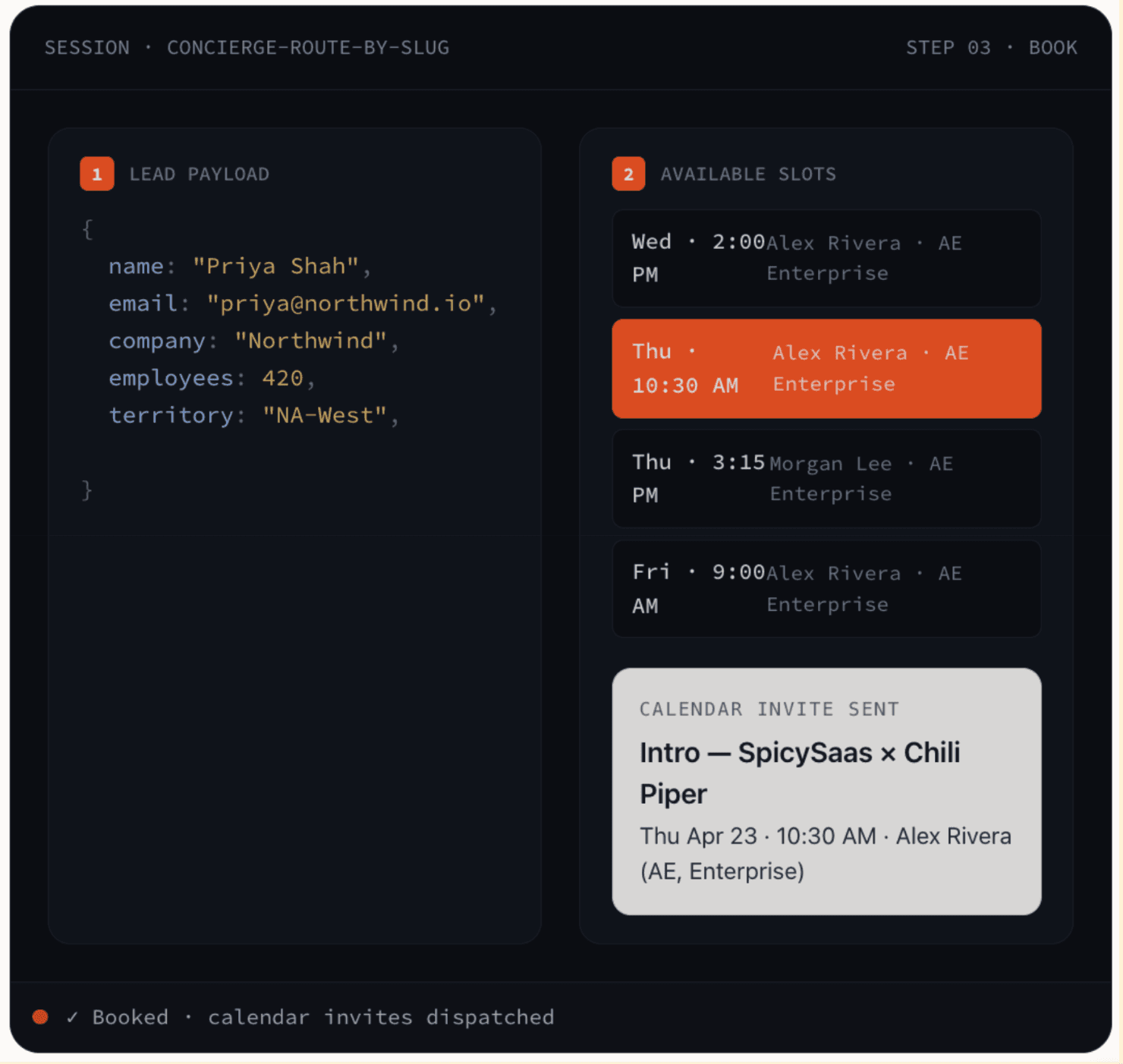
Once the prospect chooses a time, Chili Piper can book the meeting and send the calendar invite.
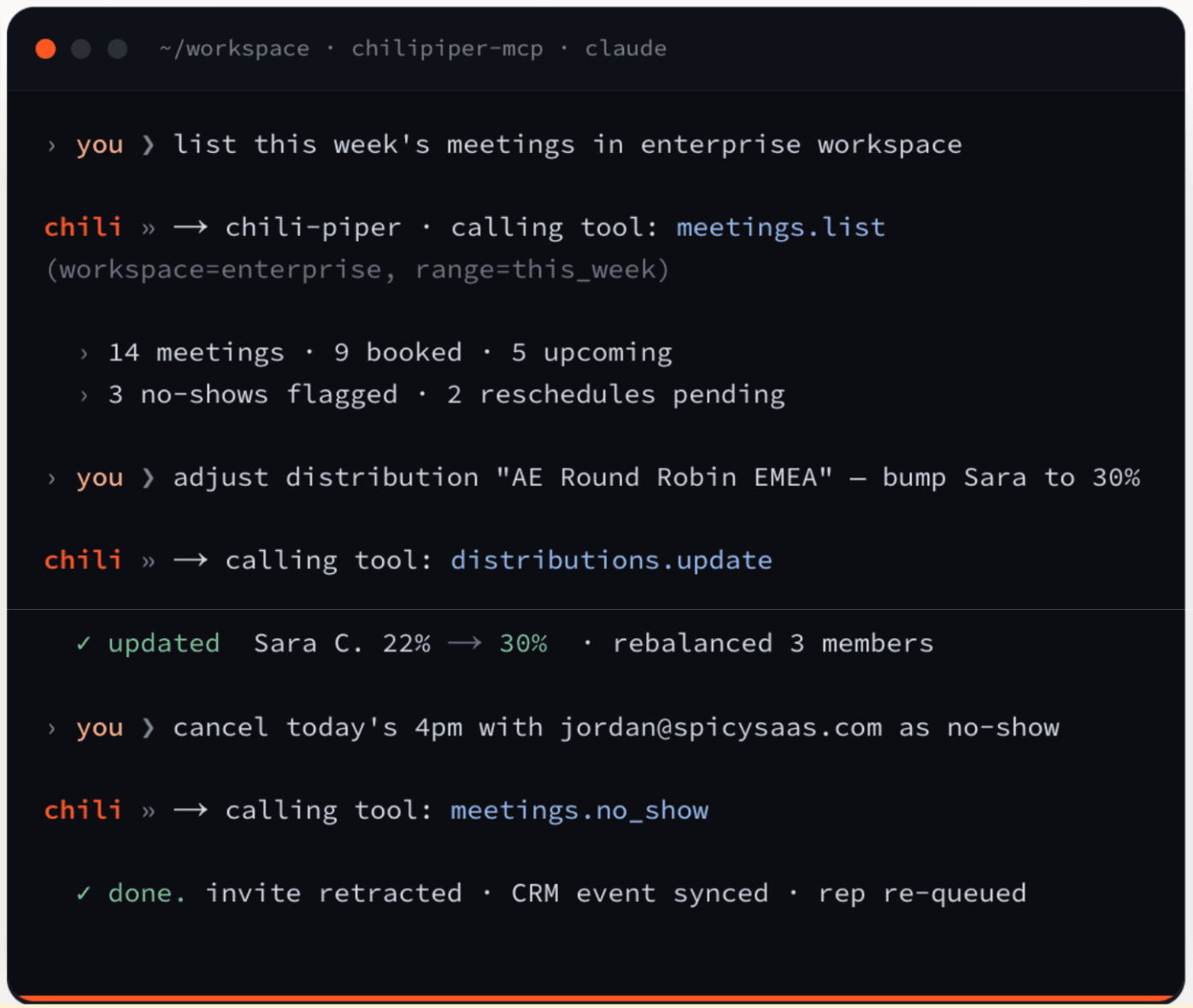
For meetings that are already booked, you can use MCP to cancel a meeting or mark the prospect as a no-show.
Update operational configuration
Your team member with Admin access can use MCP to change parts of the Chili Piper setup.
For example, they could ask the AI assistant to change how leads are distributed between reps, create or update a routing rule, or add users to a team or workspace.
Note: These changes affect your live Chili Piper setup, so they need more care than simply asking the AI to look up information.
The AI client can ask for approval before making changes. You can also limit what it can access by using an API key with narrower permissions.
How to connect Chili Piper to an AI assistant
The exact Chili Piper MCP setup depends on which AI tool you use, but the connection follows the same basic process regardless:
Check that your account and AI tool are supported. MCP is available on all Chili Piper plans and supported AI tools include ChatGPT, Claude, Cursor, Gemini CLI, and OpenAI Codex.
Choose the Chili Piper MCP authentication method. ChatGPT and Claude can connect through Open Authorization (OAuth), using the permissions of the Chili Piper user who signs in. Cursor and Gemini CLI use an API key, which you can limit to specific Chili Piper actions.
Add Chili Piper’s official MCP server. Follow the setup instructions for your AI client and connect it to the Chili Piper MCP server.
Check that you connected the right Chili Piper account. Ask the assistant “Which Chili Piper account is connected?” It should return your organization name.
Test a read-only task first. Ask your AI assistant to find a meeting or inspect a routing rule. Confirm it can access the expected data before allowing it to make changes.
MCP or API: which one fits your workflow?
Use MCP when you want an AI assistant to work with Chili Piper through natural-language requests. Use the API when you want to build a fixed integration or automated workflow between systems.
For example, MCP is a better fit if you want someone on your team to ask an assistant something like:
Why was this lead routed to this rep?
Find this meeting and reschedule it.
Check which routing rule matched.
Update a distribution or router.
The AI assistant decides which supported Chili Piper action to use based on your request.
On the other hand, API is a better fit when the workflow should automatically run in the background. For instance, your application might need to create a meeting whenever a specific event happens, retrieve Chili Piper data on a schedule, or connect Chili Piper to an internal system with predefined logic.
Chili Piper also opens its booking flow through the API: you send lead data, get available slots, and book the meeting for Concierge, Handoff, and ChiliCal. That lets a team put Chili Piper’s routing behind its own chatbot, voice agent, or booking page.
The main difference is who controls the sequence. With MCP, the AI interprets the request and chooses appropriate tools. With API integration, your developers define the exact calls, conditions, and order in advance.
You can also use both. An API can handle predictable system-to-system automation, while MCP gives your team an easier way to investigate data or perform supported tasks through an AI assistant.
What to validate before relying on the use case
A successful MCP connection only confirms that your AI assistant can reach Chili Piper. You still need to test whether it can complete the workflow correctly.
Start with these checks:
Check what the connection can access. Confirm which Chili Piper account is connected and what permissions the credential has. If you use an API key, limit it to the actions the workflow actually needs.
Test how changes are approved. Some MCP actions can change live data, such as canceling a meeting or updating routing configuration. Check whether your AI client asks for confirmation before making those changes.
Confirm your AI tool supports the features you need. ChatGPT, Claude, Cursor, Gemini CLI, and OpenAI Codex don’t all handle MCP connections in exactly the same way. Make sure the actions in your Chili Piper workflow are available in the AI tool you plan to use.
Test failure scenarios. Try cases where data is missing, no rep is available, or a meeting can’t be booked. Check what the assistant returns and what happens next.
Decide who maintains the workflow. Someone should be responsible for reviewing failed actions, checking logs, updating credentials, and retesting the workflow when your Chili Piper setup changes.
Pro tip: Test the full workflow, not just the connection. MCP may be connected correctly while a specific task still fails because of permissions, missing data, or routing logic.
When does extending Chili Piper with MCP make sense?
MCP is useful when your core routing and scheduling already work, but you want an AI assistant to handle specific tasks around them.
For example, MCP can be useful if you want an assistant to:
Investigate why a lead was routed to a certain rep
Find or reschedule a meeting
Check routing rules or meeting data
Update supported parts of your Chili Piper configuration
When is it time to reassess your GTM platform?
Reassess Chili Piper if the platform itself can’t support the sales workflow you need.
While extending Chili Piper with MCP can make the platform easier to work with, it doesn’t change its core capabilities. If you’re evaluating Chili Piper’s features and overall fit, MCP is only one part of that decision.
Identify what your sales team needs. For example, you may need:
More buyer engagement before and after booking: You need to qualify and follow up with buyers across chat, email, voice, or text.
A different qualification process: You may need conversations that adapt based on what a buyer says rather than relying mainly on routing rules.
Fewer separate tools and handoffs: If your workflow depends on several tools, middleware connections, or manual steps, adding another integration may not solve the underlying complexity.
Less custom maintenance: If your team keeps building and maintaining custom workflows to support core sales tasks, compare whether another platform supports them directly.
If you’re trying to solve these gaps, it makes sense to evaluate Chili Piper alternatives rather than continuing to extend the existing setup.
Where Spara fits in that decision
Spara fits your sales process better when you want AI agents to continue engaging buyers beyond the initial qualification, routing, and booking process.
With Spara, a buyer can start a conversation with an AI agent through the chat on your website, answer qualification questions, and then book a meeting or move into follow-up. Spara can carry that context forward and write the resulting activity back to your Customer Relationship Management (CRM).
This is the main difference in how Spara and Chili Piper compare.
What you need | How Spara supports it |
Engage and qualify inbound buyers | AI agents answer questions, collect qualification information, and decide what should happen next |
Route and book meetings | Qualified buyers can be routed to sales and booked with the right rep |
Run product demos | AI Product Demos let buyers explore the product during the conversation |
Continue follow-up | Agents can continue conversations across email, voice, and text after the initial interaction |
Re-engage existing leads | Spara can reactivate dormant leads and follow up after events |
Support later-stage use cases | Agents can run renewal and customer onboarding workflows |
Keep CRM data updated | Qualification, conversation, routing, and engagement activity can be written back to the CRM |
Spara makes the most sense when you want these steps to work as one connected workflow instead of relying on separate tools and handoffs.
Final takeaway: should you keep Chili Piper, extend it, or switch?
The right choice depends on where the gap is in your current workflow.
Keep Chili Piper if its current features meet your routing, scheduling, and handoff needs, and the Chili Piper pricing still makes sense for your team.
Extend it with MCP or another Chili Piper integration if you only need to add a specific task without changing the core workflow. For example, the Chili Piper Salesforce integration lets you use CRM system data for routing and write booking activity back to Salesforce.
Switch if the platform itself cannot support the workflow you need and the workarounds create too much manual work, maintenance, or custom development.

Lauren ThompsonHead of Marketing, Spara
FAQs
Related posts
View all
GTM
Chili Piper Pricing (2026): Plans, Seats, and Total Cost
Explore Chili Piper pricing, included seats, AI credits, and annual costs. See what affects your total spend and what to confirm before choosing a plan.
Nov 2, 2026
•
7 min read

GTM
Qualified Pricing (2026): Plans, Limits, and Budgeting
Understand Qualified pricing, plan features, and usage limits. Learn what to ask for in a quote and how to compare the full cost with your sales needs.
Nov 2, 2026
•
7 min read

GTM
Qualified Integrations: API, MCP, and Stack Fit
Explore Qualified integrations, API options, and MCP capabilities. See supported tools, access requirements, and how to assess fit for your GTM stack.
Nov 2, 2026
•
5 min read
Sign up for the latest from Spara
Subscribe to get more GTM insights straight to your inbox.